Linux & Window Management ·
bspwm Dotfiles: Custom bspwm Configuration & Scripts
A vanilla-compatible rebuild of gh0stzk's bspwm-dotfiles, reconfigured for laptop compatibility with custom shell integrations for power-profile and refresh-rate switching.
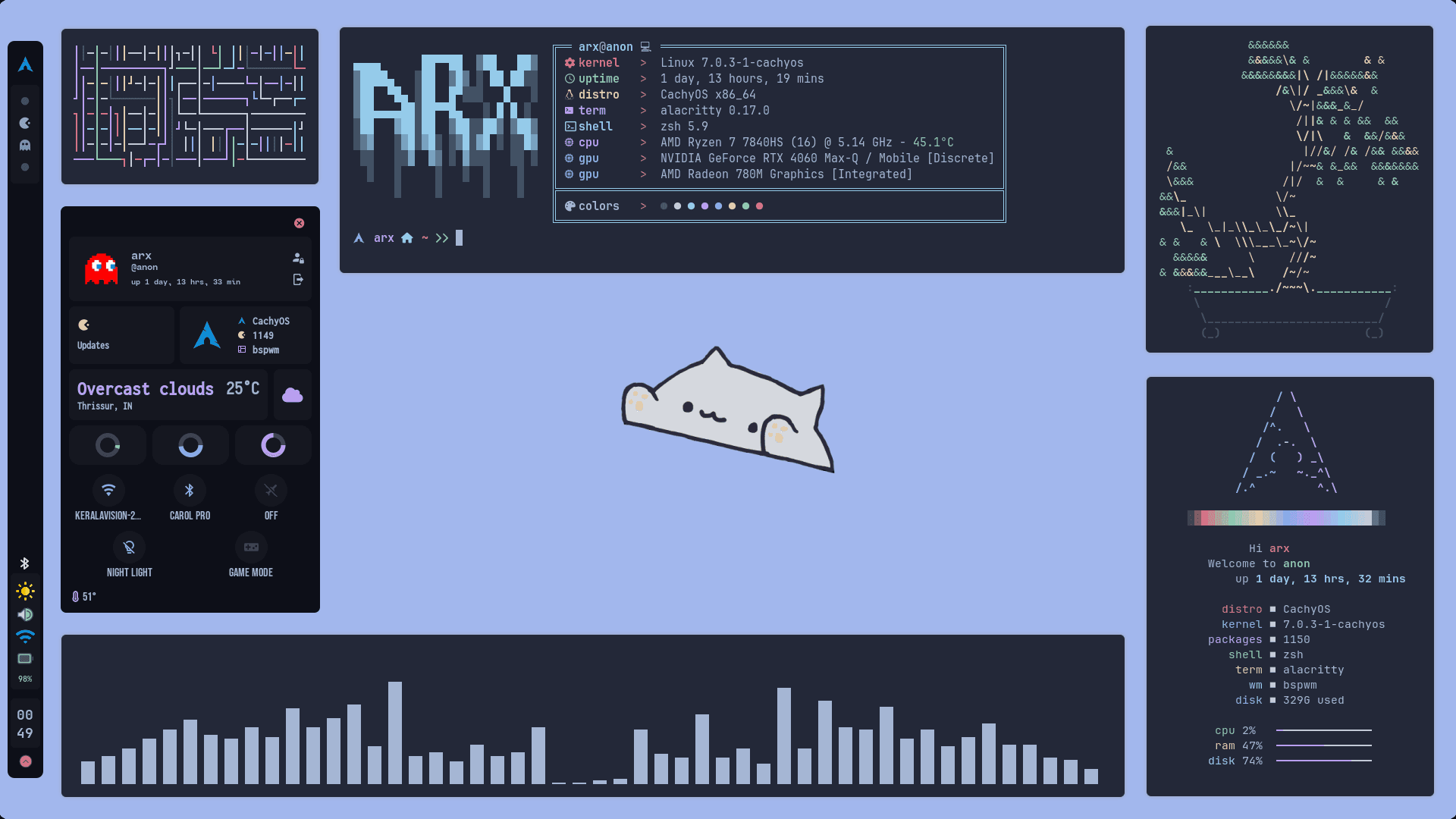
Minimalist and clean desktop interface featuring a custom EWW status bar, system information panel, resource graphs, workspace navigation, and hardware sliders.
Overview & Problem Statement
A custom "rice" (personalized desktop environment) on a lightweight window manager like BSPWM is often visually striking but notoriously fragile. Most pre-configured setups depend heavily on custom third-party package repositories (like gh0stzk-dotfiles or chaotic-aur) that clutter package lists and compromise system stability during core upgrades.
Furthermore, generic BSPWM configurations rarely address laptop-specific needs out-of-the-box, such as visual telemetry, battery throttling alerts, dynamic backlight polling, and responsive network transitions.
This project is a complete, vanilla-compatible rebuild and reconfiguration of gh0stzk's bspwm-dotfiles, designed specifically for laptop users. It strips away all third-party package requirements, migrating dependencies to official Arch Linux and AUR channels, while adding custom shell functions for active performance switching (such as power profiles and screen refresh rates) and debloating the system by removing unnecessary dependencies .
Architectural Breakdown
The entire desktop environment is composed of modular, UNIX-philosophical utilities coordinated through configuration scripting:
1. BSPWM (Binary Space Partitioning Window Manager)
Unlike traditional tiling window managers, BSPWM does not maintain a complex internal state layout engine. Instead, it represents windows strictly as leaves of a binary tree, where each internal node splits a container horizontally or vertically.
- IPC Management: Managed entirely via
bspc, which sends command sockets to the daemon. - Autostart Orchestration: Controlled via
.config/bspwm/bspwmrc, a standard executable shell script that sets desktop splits, border widths, focus rules, and initializes system services.
2. EWW (Elkowar's Wacky Widgets)
The visual centerpiece is the top/side status bar and slide-out control center, reconfigured and optimized for laptop telemetry.
- Markup Layer: Inherited and customized using
Yuck(a Lisp-like declarative syntax) to build and streamline widgets. - Styling Layer: Tailored using vanilla
CSS/SCSSto maintain modern glassmorphism backdrops and clean glowing accents. - Dynamic Pollers: Fine-tuned to use non-blocking background polling intervals (e.g.
1sfor CPU/RAM,10sfor network state, and5sfor battery) to keep UI rendering asynchronous, preventing any block on input threads while saving precious battery cycles.
3. Keyboard Shortcut Layer (sxhkd)
Keybindings are handled externally by sxhkd (Simple X Hotkey Daemon). This decouples hotkeys from the window manager itself, meaning that if the window manager crashes, shortcuts still process signals. It executes bspc instructions directly, managing window nodes, layouts, focus movement, and resizing.
Themes & Instant Rice Swapper
The original gh0stzk project is renowned for its modular theme engine. This configuration inherits and streamlines that Rice Switcher, enabling hot-swapping between two highly polished setups: z0mbi3 (an ultra-minimal monochrome layout) and andrea (a colorful, widget-heavy layout) with a single CLI call or UI widget tap.
Rather than forcing an X server restart (which closes active applications), the inherited switcher script performs a seamless layout reload:
- Config Modification: Rewrites symlinks for
~/.config/eww,~/.config/rofi, and~/.config/dunstto point to the selected theme directory. - EWW Reinitialization: Kills existing EWW bar instances, clears variables, and respawns the new widgets layout instantly.
- BSPWM/sxhkd Reload: Fires a
bspc wm -rsignal to re-read window rules and forcessxhkdto reload its config keymaps.
Laptop Power & Performance Integrations
To solve the laptop-specific challenge of balancing battery life and performance, this configuration introduces custom system controls directly integrated into the shell environment (.zshrc):
- Dynamic Refresh Rate Handlers: Implemented shell functions (
60hzand144hz) that query the active primary display (e.g.,eDPoreDP-1) viaxrandrand dynamically adjust display timings and refresh rates. - Unified Hardware Profiles: Created custom command aliases (
performanceandbattery) to orchestrate multi-layered hardware states:- Performance Mode: Sets the system power governor to performance via
powerprofilesctland simultaneously pumps the display refresh rate to144Hzfor buttery-smooth interaction. - Battery Saver Mode: Throttles the system power governor to power-saver and drops the display to
60Hzinstantly, dramatically extending laptop battery longevity.
- Performance Mode: Sets the system power governor to performance via
- Intelligent Debloating: Stripped away unnecessary background daemons and reduced the 18 default themes down to 2 core presets.
Core Dependencies & Config Files
To reproduce this environment on a vanilla Arch Linux system, only standard upstream packages are required:
| Component | Standard Package | Purpose |
|---|---|---|
| Window Manager | bspwm | Core binary tree window layouts |
| Hotkey Daemon | sxhkd | Keybinding mapping and custom script execution |
| Widget Engine | eww | Status bar, system panel, calendar widgets |
| Notification Daemon | dunst | Lightweight, CSS-stylable desktop notifications |
| Launcher / Menu | rofi | Unified application launcher and power menu (inherited and reconfigured) |
| Audio Control | pipewire-pulse, pamixer | Sound engine configuration and CLI keys mapping |
| Backlight CLI | brightnessctl | Fast, rootless display brightness adjustments |
Project Outcome
This configuration is a personal, iterative project aimed at tailoring the window manager and shell experience to my exact hardware needs and workflow preferences, rather than relying on a generalized template that carries design decisions or components I don't use. By rebuilding it from vanilla sources and debloating the environment specifically removing redundant modules, unused themes and dependencies like Polybar. I was able to achieve a highly optimized, clean and completely reliable setup that strikes a perfect balance for daily use on a laptop.